Smart coffee makers do more than brew a morning cup. Many now connect to apps, remember user preferences, track cleaning cycles, and use sensors to control temperature, pressure, and water flow. That convenience is appealing, but it also means owners need a slightly different approach to care. This guide explains what smart coffee machine maintenance involves, why it matters, and how beginners can build simple routines that protect both performance and longevity.
If you have ever wondered why a connected coffee machine suddenly brews slower, displays a descale alert, loses Wi-Fi, or starts making inconsistent drinks, maintenance is often the reason. Like any appliance that combines water, heat, electronics, and moving parts, smart coffee machines perform best when they are cleaned regularly and used with care. The good news is that you do not need to be a technician to keep one running well. A few practical habits can prevent expensive repairs and extend the life of your machine.
Smart Coffee Machine Maintenance: What This Guide Covers
This beginner’s guide to smart coffee machine maintenance breaks down the main concepts in a simple way. You will learn how smart coffee technology has changed maintenance needs, what kinds of problems connected machines commonly face, how to create a realistic preventive care routine, and how to troubleshoot issues like sensor alerts and connectivity failures. Along the way, you will also see real-life examples and practical tips that make maintenance easier to remember and follow.
The Evolution of Smart Coffee Technology
Traditional coffee makers were mostly mechanical. If something went wrong, the issue was often visible: a clogged filter, mineral buildup, or a worn gasket. Smart coffee machines add digital layers on top of those same brewing mechanics. They may include companion apps, touchscreens, programmable drink profiles, automatic milk systems, bean sensors, maintenance alerts, and cloud-connected features.
This evolution has made brewing more precise and personalized. For example, a smart espresso machine may let one family member save a stronger morning shot while another saves a larger, milk-based recipe for weekends. Some models can schedule brews remotely or notify users when water is low. These features improve convenience, but they also increase the number of components that must work together properly.
In real life, this means the machine is no longer just a brewer. It is a small ecosystem. Water lines, grinders, pumps, heating elements, sensors, software, and wireless functions all influence the final cup. When owners understand that, maintenance starts to make more sense. You are not just wiping down a machine. You are caring for a compact kitchen appliance that blends hardware and software.
Key Components in Modern Brewing Systems
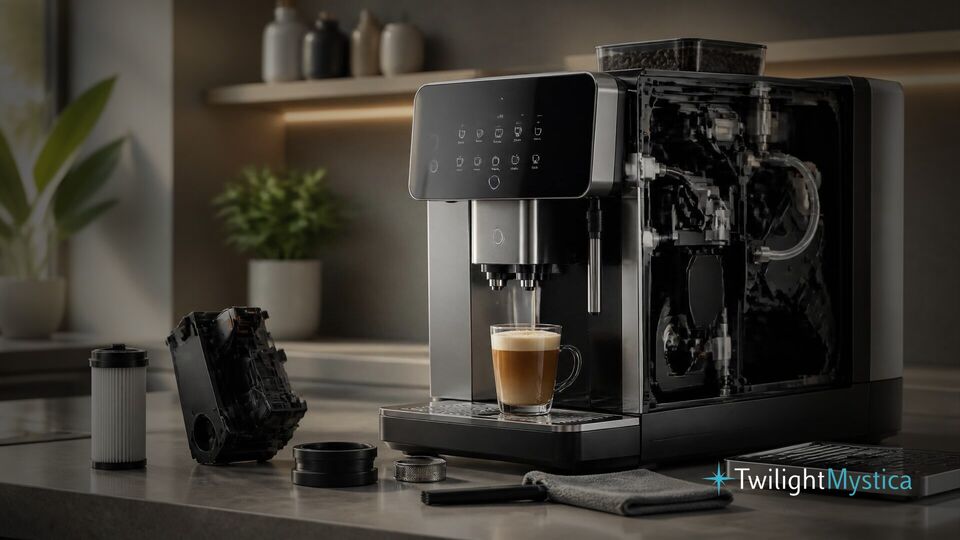
To maintain a smart coffee machine well, it helps to know its major parts. The water reservoir supplies the brewing system and must stay clean to avoid odors, biofilm, and mineral residue. The brew group or brewing chamber handles extraction and often collects coffee oils that affect taste over time. In bean-to-cup systems, the grinder is another critical part, since old grounds and oily beans can create buildup or clogging.
Then there are the digital elements. Sensors may detect water level, bean supply, tray position, door closure, or brew temperature. Firmware controls automated functions and can influence performance. Connectivity hardware, such as Wi-Fi or Bluetooth modules, supports app-based features. Finally, many machines include milk frothing systems, which require especially careful cleaning because milk residue spoils quickly.
A helpful way to think about maintenance is to divide it into two categories: flavor-related care and function-related care. Flavor-related care includes cleaning coffee oils, old grounds, and milk residue. Function-related care includes descaling, checking seals, updating firmware, and resolving alerts. Both matter if you want the machine to last and keep producing coffee that tastes as intended.
Common Maintenance Challenges for Connected Machines
Smart coffee machines face many of the same issues as standard models, but their added technology creates a few extra challenges. One common issue is that users trust automation too much. Because the machine displays reminders or automates part of the cleaning cycle, owners sometimes assume it is “self-maintaining.” In practice, automatic rinse cycles help, but they do not replace manual cleaning.
Another challenge is buildup that forms gradually and goes unnoticed until performance drops. Mineral deposits from hard water can narrow internal pathways and reduce heating efficiency. Coffee oils can coat brewing parts and create bitter flavors. Milk residue can block frothing tubes or create hygiene problems. Because smart machines often compensate for small issues at first, owners may not recognize the warning signs until a larger fault appears.
There is also the issue of digital dependence. If an app fails to sync or a firmware setting resets, users may lose access to preferred drink profiles or maintenance notifications. A machine might still work, but less conveniently. In households where several people use the same machine daily, these small disruptions can become frustrating fast.
For example, imagine a busy remote worker who depends on a scheduled brew every morning. If the machine’s app disconnects from Wi-Fi after a router change, the brewing schedule may stop working. That is not a mechanical breakdown, but it still affects the overall user experience. Smart coffee machine maintenance includes paying attention to these digital details before they become daily annoyances.
Managing Firmware and Digital Connectivity Issues
Firmware updates are one of the newer responsibilities that come with connected appliances. These updates may improve stability, fix bugs, refine sensor behavior, or patch security issues. Beginners often ignore update prompts because the machine still appears to function normally. However, outdated firmware can sometimes cause glitches, failed app connections, or inaccurate alerts.
A good habit is to check for updates during a low-pressure moment rather than when you urgently need coffee. If your machine uses an app, review notification settings so you actually receive maintenance and update reminders. During setup, save your login details somewhere secure and connect the machine to a stable home network rather than a temporary guest network.
If connectivity becomes unreliable, start simple. Restart the machine, restart the router, confirm the app is current, and make sure the appliance remains within signal range. Also check whether power interruptions caused the machine to lose network settings. These are small steps, but they solve many common digital issues without needing service.
One practical tip: after any firmware update, brew a test drink and run a rinse cycle. This gives you a quick way to confirm that settings, profiles, and key functions still behave normally.
Best Practices for Extending Coffee Machine Lifespan
Longevity is usually the result of consistent care, not occasional deep cleaning after a problem appears. A smart coffee machine lasts longer when owners reduce stress on internal components, use the machine as intended, and respond early to warning signs. This starts with water quality. If your local water is hard, limescale will accumulate faster, so using an approved filter or suitable water source can significantly reduce strain on the heating system and pump.
Another best practice is to avoid letting waste build up. Empty the drip tray, used grounds container, and water tank regularly. Standing moisture creates odors and can encourage residue or mold growth. If your machine has a removable brew group, clean it on the schedule recommended by the manufacturer and let it dry properly before reinstalling.
Bean choice matters too. Very oily dark-roast beans can leave more residue inside grinders and brewing paths. That does not mean you must avoid them completely, but if your machine struggles with buildup, alternating with less oily beans may reduce maintenance demands. Using fresh beans and storing them properly also helps grinding performance.
It is equally important to respect the machine’s workload. In a large household, a machine making many drinks per day wears faster than one used lightly. If your model is designed for moderate home use, repeated back-to-back brewing sessions may heat parts more aggressively and increase wear. Spacing heavy use when possible, or choosing a machine sized for your household’s habits, can make a real difference over the years.
Cleaning Cycles and Preventive Care Routines
The easiest maintenance plan is one based on frequency. Daily tasks might include rinsing removable milk parts, wiping the steam wand, emptying the drip tray, and refreshing the water tank. Every few days, you can inspect the bean hopper, wipe exterior surfaces, and check whether old grounds have collected where they should not.
Weekly care may include washing removable trays and lids with mild soap, cleaning the brew area, and checking for residue around nozzles. Monthly tasks often include running a deeper cleaning cycle, cleaning the grinder area if your model allows it, and inspecting seals or gaskets for wear. Descaling happens less often and depends on water hardness and usage volume, but it should not be delayed once the machine prompts for it.
Here is a simple beginner routine:
- After each use: rinse milk-contact parts and wipe spills.
- Daily: empty trays and grounds, refill with fresh water.
- Weekly: wash removable components and inspect the brew outlet.
- Monthly: run a cleaning program and review app alerts.
- As needed: descale, replace water filters, and update firmware.
A real-life example is helpful here. Suppose you own a smart latte machine and mostly use it for milk drinks. If you skip cleaning the milk line “just once” after a busy day, residue can dry quickly. Repeating that habit over a week may reduce froth quality or trigger hygiene alerts. By contrast, a 60-second rinse routine after each use can prevent both flavor and performance issues.
Troubleshooting Connectivity and Sensor Errors
Smart machines often display warnings that feel mysterious at first. A sensor error does not always mean a part is broken. Sometimes the issue is simple: the water tank is slightly misaligned, the drip tray is not fully seated, or grounds are blocking a detection point. Before assuming the worst, turn the machine off, remove and reseat accessible components, and inspect for obvious residue or misplacement.
If the machine reports low water when the tank is full, check whether a float sensor is stuck or whether scale is affecting movement. If it says the bean hopper is empty when beans are present, inspect for bridging or oily residue that prevents normal feed. If a door or tray sensor keeps triggering, clean around the contact areas and make sure nothing is warped or obstructed.
Connectivity errors should be treated methodically. Confirm the machine is connected to the correct network, verify your password did not change, and ensure the app still supports your model and operating system version. If the app works but notifications stopped, check phone permissions. In many cases, the coffee machine itself is fine, and the issue lives in the network or mobile settings.
Keep a small maintenance log if problems repeat. Note the date, the alert, what you tried, and whether it returned. This is especially useful if you eventually contact customer support, because patterns help identify whether the issue is environmental, software-related, or mechanical. For example, if a temperature alert appears only after multiple back-to-back drinks, overheating or scale may be a more likely cause than random failure.
When to Repair, Reset, or Replace Parts
Not every issue should be solved with repeated resets. If a warning returns immediately after cleaning and reseating parts, check the manual for model-specific guidance. Replace consumable parts like filters, seals, or milk tubes when recommended. Continued use with worn parts can stress larger components and shorten overall lifespan.
A factory reset may help with persistent software or profile issues, but only after you have documented settings you want to keep. It is most useful when the machine behaves unpredictably despite stable power and network conditions. However, if you hear unusual grinding noises, notice leaking inside the housing, smell burning, or see repeated pump failure alerts, professional repair is the safer next step.
Think of it this way: maintenance preserves the machine, troubleshooting identifies the cause of problems, and repair addresses faults that cleaning or resetting cannot fix. Knowing the difference helps beginners avoid both overreacting and waiting too long.
Building Habits That Protect Flavor and Value
Many owners focus on longevity only after a machine becomes expensive to repair. A better approach is to connect maintenance to everyday benefits you can taste and feel immediately. Clean brewing parts produce better flavor. Descaled systems heat more consistently. Clean milk lines make smoother foam. Stable software keeps your favorite recipes accessible. In other words, maintenance is not just about preventing breakdowns years from now. It improves tomorrow morning’s cup.
If you share the machine with family or coworkers, make maintenance visible and simple. Place cleaning tablets nearby, keep a small checklist in the kitchen, or assign one weekly care task to each user. In busy homes, the biggest obstacle is usually not difficulty but forgetfulness. Clear routines solve that problem.
Protecting value matters too. Smart coffee machines can be a meaningful investment, and a well-maintained unit tends to stay more reliable over time. Even if you never plan to resell it, extending useful life lowers the long-term cost of ownership.
In summary, smart coffee machine maintenance is about caring for both brewing components and connected features. Beginners should focus on regular cleaning, prompt descaling, water quality, firmware awareness, and simple troubleshooting steps. When these habits become routine, the machine stays cleaner, brews more consistently, and is more likely to serve you well for years. A little preventive care goes a long way toward better coffee, fewer disruptions, and a longer-lasting smart appliance.